Install a SCR Screensaver on a Windows Computer
In relation to Axialis Screensaver Producer, this article offers information on the following topics:
If an install procedure is provided with the screensaver, just install it launching the procedure. When a screensaver is distributed as a simple SCR file, You have to follow this procedure to install it on a computer:
1. Copy the SCR file in your system folder : C:\WINDOWS\SYSTEM32.
2. Right-click in the Windows Desktop background and select "Properties". A dialog box opens. Select the "Screen Saver" tab:
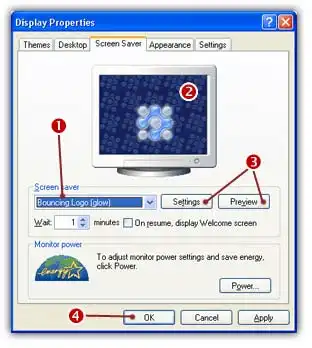
3. Select your screensaver in the list 1. (it should appear in this list if you copied it in the correct folder). The screensaver appears in the Preview screen 2.
4. You can adjust the screensaver settings or display it full screen 3.
5. When all done, click OK 4
How to uninstall a screensaver?
If an uninstall procedure is provided with the screensaver, just un-install it launching the procedure. When a screensaver is distributed as a simple SCR file, you have to locate the SCR file and delete it. You can also choose another screensaver (or simply specify "None") in the above list 1.